Interacting with Common Services
Server Message Block (SMB)
SMB is commonly used in Windows networks, and we will often find share folders in a Windows network. We can interact with SMB using the GUI, CLI, or tools. Let us cover some common ways of interacting with SMB using Windows & Linux.
Windows
On Windows GUI, we can press [WINKEY] + [R] to open the Run dialog box and type the file share location, e.g.: \\192.168.220.129\Finance\
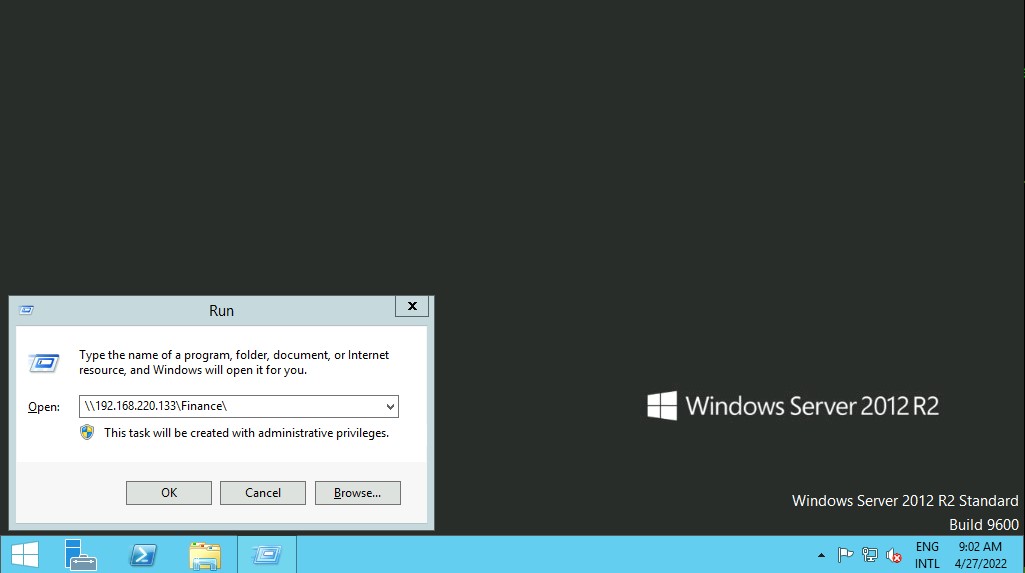
Windows CMD - DIR
C:\htb> dir \\192.168.220.129\Finance\The command net use connects a computer to or disconnects a computer from a shared resource or displays information about computer connections. We can connect to a file share with the following command and map its content to the drive letter n.
Windows CMD - Net Use
C:\htb> net use n: \\192.168.220.129\FinanceC:\htb> net use n: \\192.168.220.129\Finance /user:plaintext Password123Windows CMD - DIR
C:\htb> dir n: /a-d /s /b | find /c ":\"| Syntax | Description |
|---|---|
| dir | Application |
| n: | Directory or drive to search |
| /a-d | /a is the attribute and -d means not directories |
| /s | Displays files in a specified directory and all subdirectories |
| /b | Uses bare format (no heading information or summary) |
The following command | find /c ":\\" process the output of dir n: /a-d /s /b to count how many files exist in the directory and subdirectories. You can use dir /? to see the full help. Searching through 29,302 files is time consuming, scripting and command line utilities can help us speed up the search. With dir we can search for specific names in files such as:
- cred
- password
- users
- secrets
- key
- Common File Extensions for source code such as: .cs, .c, .go, .java, .php, .asp, .aspx, .html.
C:\htb>dir n:\*cred* /s /b

C:\htb>dir n:\*secret* /s /b
Windows CMD - Findstr
c:\htb>findstr /s /i cred n:\*.*Windows PowerShell
PS C:\htb> Get-ChildItem \\192.168.220.129\Finance\

    Directory: \\192.168.220.129\Finance

Mode                 LastWriteTime         Length Name
----                 -------------         ------ ----
d-----         2/23/2022   3:27 PM                Contracts
Instead of net use, we can use New-PSDrive in PowerShell.
PS C:\htb> New-PSDrive -Name "N" -Root "\\192.168.220.129\Finance" -PSProvider "FileSystem"

Name           Used (GB)     Free (GB) Provider      Root                                               CurrentLocation
----           ---------     --------- --------      ----                                               ---------------
N                                      FileSystem    \\192.168.220.129\Finance
Windows PowerShell - PSCredential Object
PS C:\htb> $username = 'plaintext'
PS C:\htb> $password = 'Password123'
PS C:\htb> $secpassword = ConvertTo-SecureString $password -AsPlainText -Force
PS C:\htb> $cred = New-Object System.Management.Automation.PSCredential $username, $secpassword
PS C:\htb> New-PSDrive -Name "N" -Root "\\192.168.220.129\Finance" -PSProvider "FileSystem" -Credential $cred

Name           Used (GB)     Free (GB) Provider      Root                                                              CurrentLocation
----           ---------     --------- --------      ----                                                              ---------------
N                                      FileSystem    \\192.168.220.129\Finance
In PowerShell, we can use the command Get-ChildItem or the short variant gci instead of the command dir.
Windows PowerShell - GCI
PS C:\htb> N:
PS N:\> (Get-ChildItem -File -Recurse | Measure-Object).Count

29302
We can use the property -Include to find specific items from the directory specified by the Path parameter.
PS C:\htb> Get-ChildItem -Recurse -Path N:\ -Include *cred* -File

    Directory: N:\Contracts\private

Mode                 LastWriteTime         Length Name
----                 -------------         ------ ----
-a----         2/23/2022   4:36 PM             25 credentials.txt
The Select-String cmdlet uses regular expression matching to search for text patterns in input strings and files. We can use Select-String similar to grep in UNIX or findstr.exe in Windows.
Windows PowerShell - Select-String
PS C:\htb> Get-ChildItem -Recurse -Path N:\ | Select-String "cred" -List

N:\Contracts\private\secret.txt:1:file with all credentials
N:\Contracts\private\credentials.txt:1:admin:SecureCredentials!
Linux - Mount
sudo mkdir /mnt/Finance
sudo mount -t cifs -o username=plaintext,password=Password123,domain=. //192.168.220.129/Finance /mnt/Finance
mount -t cifs //192.168.220.129/Finance /mnt/Finance -o credentials=/path/credentialfileLinux - Find
find /mnt/Finance/ -name *cred*grep -rn /mnt/Finance/ -ie cred