Extracting Passwords from the Network
Credential Hunting in Network Traffic
Wireshark
| Wireshark filter | Description |
|---|---|
| ip.addr == 56.48.210.13 | Filters packets with a specific IP address. |
| tcp.port == 80 | Filters packets by port (HTTP in this case). |
| http | Filters for HTTP traffic. |
| dns | Filters DNS traffic, useful to monitor domain name resolution. |
| tcp.flags.syn == 1 && tcp.flags.ack == 0 | Filters SYN packets (used in TCP handshakes), useful for detecting scans or connection attempts. |
| icmp | Filters ICMP packets (Ping), useful for reconnaissance or network issues. |
| http.request.method == “POST” | Filters HTTP POST requests. Over unencrypted HTTP this may expose passwords or other sensitive info. |
| tcp.stream eq 53 | Filters a specific TCP stream, helpful to track a conversation between two hosts. |
| eth.addr == 00:11:22:33:44:55 | Filters packets from/to a specific MAC address. |
| ip.src == 192.168.24.3 && ip.dst == 56.48.210.3 | Filters traffic between two specific IPs, helps track communication between hosts. |
Pcredz
Pcredz is a tool that can be used to extract credentials from live traffic or network packet captures. Specifically, it supports extracting the following information:
- Credit card numbers
- POP credentials
- SMTP credentials
- IMAP credentials
- SNMP community strings
- FTP credentials
- Credentials from HTTP NTLM/Basic headers, as well as HTTP Forms
- NTLMv1/v2 hashes from various traffic including DCE-RPC, SMBv1/2, LDAP, MSSQL, and HTTP
- Kerberos (AS-REQ Pre-Auth etype 23) hashes
./Pcredz -f demo.pcapng -t -vCredential Hunting in Network Shares
Hunting from Windows
Snaffler
The first tool we will cover is Snaffler. This is a C# program that, when run on a domain-joined machine, automatically identifies accessible network shares and searches for interesting files.
c:\Users\Public>Snaffler.exe -sPowerHuntShares
Another tool that can be used is PowerHuntShares, a PowerShell script that doesn’t necessarily need to be run on a domain-joined machine.
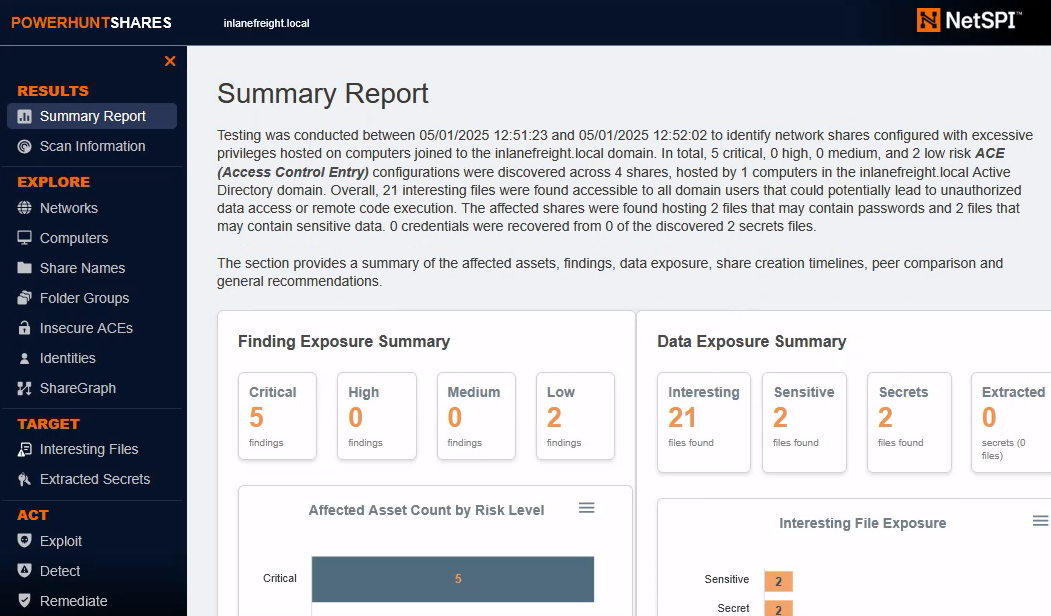
We can run a basic scan using PowerHuntShares like so:
PS C:\Users\Public\PowerHuntShares> Invoke-HuntSMBShares -Threads 100 -OutputDirectory c:\Users\PublicHunting from Linux
MANSPIDER
If we don’t have access to a domain-joined computer, or simply prefer to search for files remotely, tools like MANSPIDER allow us to scan SMB shares from Linux.
./manspider.py --threads 256 10.129.180.240 -u mendres -p Inlanefreight2025! -c passwd login creds passwordNetExec
nxc smb 10.129.234.121 -u mendres -p 'Inlanefreight2025!' --spider IT --content --pattern "passw"